

Home Lab
The hardware behind cloudbricks.dev — a nested-VMware ThinkPad that grew into a rack-mounted HPE ProLiant.
Everything published on this site gets built, broken, and rebuilt on hardware I keep at home. This page is the inventory, and more usefully, the reasoning behind it.
Why a home lab?
Like most people who ended up here, I started with VMware running inside VMware Workstation on a laptop — nested virtualization, no hardware, maximum convenience. It was enough to learn on and not enough to stay on.
Eventually the number of workloads I wanted to run outgrew what a laptop could reasonably host, so the lab graduated to real hardware. Nothing here is exotic. It’s a refurbished enterprise server and a ThinkPad, chosen for what they cost rather than what they are.
My portable lab
The first dedicated machine. It still handles anything that doesn’t need a real hypervisor underneath it.
- Intel Core i7-9750H @ 2.60 GHz
- 64 GB DDR4 SDRAM
- 2 × 1 TB Sabrent Rocket NVMe SSD
- NVIDIA GeForce GTX 1650 (Max-Q Design)
The rack server
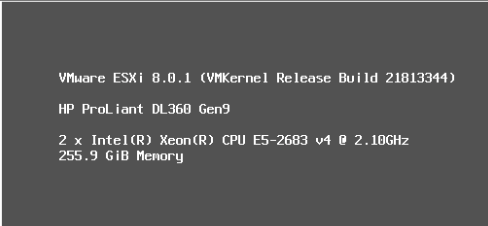
When nested virtualization stopped being enough, I picked up a refurbished HPE ProLiant DL 360 G9 from eBay. Two-socket, plenty of RAM, and cheap enough that experimenting with it didn’t hurt.
- 2 × Intel Xeon E2683 v4 (16 cores each, 32 total)
- 256 GB DDR4 RAM
- 2 × 480 GB SSD
- 1 × 2 TB PCIe NVMe SSD
- 1 × 512 GB PCIe NVMe SSD
A word of caution
This is a personal blog and a personal lab. Everything published here reflects my own opinions and my own experience, not any official guidance. Lab hardware also fails in ways production systems usually don’t — verify anything you read here in your own environment before it reaches anything you care about.