

How to Create ESXi Template in vSphere - using Packer
Building a nested-lab ESXi 7 template with the Packer vSphere plugin, using a shared HCL file structure and a scripted install.
Overview
Packer uses the HashiCorp Configuration Language (HCL), which allows concise descriptions of the steps required to produce a build. See the HCL templates reference.
This is the file structure I’ve used:
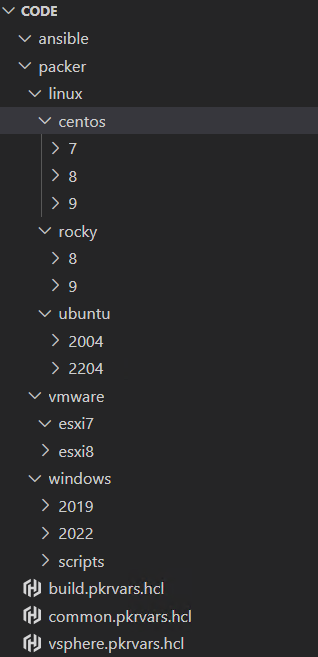
The two files below are shared by every template in the series, and are called by the Packer tool itself:
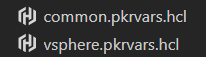
1. common.pkrvars.hcl
// Virtual Machine Settings
common_vm_version           = 19
common_tools_upgrade_policy = true
common_remove_cdrom         = true

// Template and Content Library Settings
common_template_conversion         = false
common_content_library_name        = "vm_library"
common_content_library_ovf         = false
common_content_library_destroy     = false
common_content_library_skip_export = false

// Removable Media Settings
common_iso_datastore = "OS_ISO"

// Boot and Provisioning Settings
common_data_source       = "http"
common_http_ip           = null
common_http_port_min     = 8000
common_http_port_max     = 8099
common_ip_wait_timeout   = "20m"
common_ip_settle_timeout = "5s"
common_shutdown_timeout  = "15m"
2. vsphere.pkrvars.hcl
// vSphere Credentials - replace with your configuration
vsphere_endpoint            = "vcsa.cloudbricks.local"
vsphere_username            = "Administrator@vsphere.local"
vsphere_password            = "SuperSecretPassword"
vsphere_insecure_connection = false

// vSphere Settings
vsphere_datacenter                     = "Lab"
//vsphere_cluster                      = "Cluster"
vsphere_host                           = "esx-base.cloudbricks.local"
vsphere_datastore                      = "SSD"
vsphere_network                        = "cloudbricks"
vsphere_folder                         = "Templates"

vsphere_set_host_for_datastore_uploads = false
Below files are used for the ESXi template. This one builds the nested VMware lab.
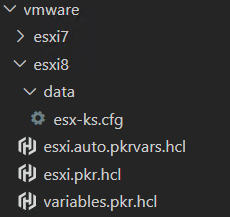
1. variables.pkr.hcl
Contains all input variables to which you assign values. Any explicit values in this file will override the declared default values (these are found in the following file). The auto extension enables Packer to use this file automatically. It does not require you to reference or pass it in the command line explicitly
variable "vsphere_endpoint" {
  type        = string
  description = "The fully qualified domain name or IP address of the vCenter Server instance."
}

variable "vsphere_username" {
  type        = string
  description = "The username to login to the vCenter Server instance."
  sensitive   = true
}

variable "vsphere_password" {
  type        = string
  description = "The password for the login to the vCenter Server instance."
  sensitive   = true
}

variable "vsphere_insecure_connection" {
  type        = bool
  description = "Do not validate vCenter Server TLS certificate."
}

// vSphere Settings

variable "vsphere_datacenter" {
  type        = string
  description = "The name of the target vSphere datacenter."
  default     = ""
}

variable "vsphere_cluster" {
  type        = string
  description = "The name of the target vSphere cluster."
  default     = ""
}

variable "vsphere_host" {
  type        = string
  description = "The name of the target ESXi host."
  default     = ""
}

variable "vsphere_datastore" {
  type        = string
  description = "The name of the target vSphere datastore."
}

variable "vsphere_network" {
  type        = string
  description = "The name of the target vSphere network segment."
}

variable "vsphere_folder" {
  type        = string
  description = "The name of the target vSphere folder."
  default     = ""
}

variable "vsphere_resource_pool" {
  type        = string
  description = "The name of the target vSphere resource pool."
  default     = ""
}

variable "vsphere_set_host_for_datastore_uploads" {
  type        = bool
  description = "Set this to true if packer should use the host for uploading files to the datastore."
  default     = false
}

// Virtual Machine Settings

variable "vm_guest_os_language" {
  type        = string
  description = "The guest operating system lanugage."
  default     = "en_US"
}

variable "vm_guest_os_keyboard" {
  type        = string
  description = "The guest operating system keyboard input."
  default     = "us"
}

variable "vm_guest_os_timezone" {
  type        = string
  description = "The guest operating system timezone."
  default     = "UTC"
}

variable "vm_guest_os_family" {
  type        = string
  description = "The guest operating system family. Used for naming and VMware Tools."
}

variable "vm_guest_os_name" {
  type        = string
  description = "The guest operating system name. Used for naming."
}

variable "vm_guest_os_version" {
  type        = string
  description = "The guest operating system version. Used for naming."
}

variable "vm_guest_os_type" {
  type        = string
  description = "The guest operating system type, also know as guestid."
}

variable "vm_firmware" {
  type        = string
  description = "The virtual machine firmware."
  default     = "efi"
}

variable "vm_cdrom_type" {
  type        = string
  description = "The virtual machine CD-ROM type."
  default     = "sata"
}

variable "vm_cpu_count" {
  type        = number
  description = "The number of virtual CPUs."
}

variable "vm_cpu_cores" {
  type        = number
  description = "The number of virtual CPUs cores per socket."
}

variable "vm_cpu_hot_add" {
  type        = bool
  description = "Enable hot add CPU."
  default     = false
}

variable "vm_mem_size" {
  type        = number
  description = "The size for the virtual memory in MB."
}

variable "vm_mem_hot_add" {
  type        = bool
  description = "Enable hot add memory."
  default     = false
}

variable "vm_disk_size" {
  type        = number
  description = "The size for the virtual disk in MB."
}

variable "vm_disk_controller_type" {
  type        = list(string)
  description = "The virtual disk controller types in sequence."
  default     = ["pvscsi"]
}

variable "vm_disk_thin_provisioned" {
  type        = bool
  description = "Thin provision the virtual disk."
  default     = true
}

variable "vm_network_card" {
  type        = string
  description = "The virtual network card type."
  default     = "vmxnet3"
}

variable "common_vm_version" {
  type        = number
  description = "The vSphere virtual hardware version."
}

variable "common_tools_upgrade_policy" {
  type        = bool
  description = "Upgrade VMware Tools on reboot."
  default     = true
}

variable "common_remove_cdrom" {
  type        = bool
  description = "Remove the virtual CD-ROM(s)."
  default     = true
}

// Template and Content Library Settings

variable "common_template_conversion" {
  type        = bool
  description = "Convert the virtual machine to template. Must be 'false' for content library."
  default     = false
}

variable "common_content_library_name" {
  type        = string
  description = "The name of the target vSphere content library, if used."
  default     = null
}

variable "common_content_library_ovf" {
  type        = bool
  description = "Export to content library as an OVF template."
  default     = true
}

variable "common_content_library_destroy" {
  type        = bool
  description = "Delete the virtual machine after exporting to the content library."
  default     = true
}

variable "common_content_library_skip_export" {
  type        = bool
  description = "Skip exporting the virtual machine to the content library. Option allows for testing/debugging without saving the machine image."
  default     = false
}

// OVF Export Settings

variable "common_ovf_export_enabled" {
  type        = bool
  description = "Enable OVF artifact export."
  default     = false
}

variable "common_ovf_export_overwrite" {
  type        = bool
  description = "Overwrite existing OVF artifact."
  default     = true
}

// Removable Media Settings

variable "common_iso_datastore" {
  type        = string
  description = "The name of the source vSphere datastore for the guest operating system ISO."
}

variable "iso_path" {
  type        = string
  description = "The path on the source vSphere datastore for the guest operating system ISO."
}

variable "iso_file" {
  type        = string
  description = "The file name of the guest operating system ISO."
}

// Boot Settings

variable "common_data_source" {
  type        = string
  description = "The provisioning data source. One of `http` or `disk`."
}

variable "common_http_ip" {
  type        = string
  description = "Define an IP address on the host to use for the HTTP server."
  default     = null
}

variable "common_http_port_min" {
  type        = number
  description = "The start of the HTTP port range."
}

variable "common_http_port_max" {
  type        = number
  description = "The end of the HTTP port range."
}

variable "vm_boot_order" {
  type        = string
  description = "The boot order for virtual machines devices."
  default     = "disk,cdrom"
}

variable "vm_boot_wait" {
  type        = string
  description = "The time to wait before boot."
}

variable "common_ip_wait_timeout" {
  type        = string
  description = "Time to wait for guest operating system IP address response."
}

variable "common_ip_settle_timeout" {
  type        = string
  description = "Time to wait for guest operating system IP to settle down."
  default     = "5s"
}

variable "common_shutdown_timeout" {
  type        = string
  description = "Time to wait for guest operating system shutdown."
}

// Communicator Settings and Credentials


variable "communicator_proxy_host" {
  type        = string
  description = "The proxy server to use for SSH connection. (Optional)"
  default     = null
}

variable "communicator_proxy_port" {
  type        = number
  description = "The port to connect to the proxy server. (Optional)"
  default     = null
}

variable "communicator_proxy_username" {
  type        = string
  description = "The username to authenticate with the proxy server. (Optional)"
  default     = null
}

variable "communicator_proxy_password" {
  type        = string
  description = "The password to authenticate with the proxy server. (Optional)"
  sensitive   = true
  default     = null
}

variable "communicator_port" {
  type        = string
  description = "The port for the communicator protocol."
}

variable "communicator_timeout" {
  type        = string
  description = "The timeout for the communicator protocol."
}
2. esxi.pkr.hcl
This file contains the blocks as mentioned in the refernece, from declared variables, build and source blocks. Packer uses this to automate the VM template creation.
//  BLOCK: packer config


packer {
  required_version = ">= 1.9.4"
  required_plugins {
    vsphere = {
      source  = "github.com/hashicorp/vsphere"
      version = ">= 1.2.1"
    }

  }
}

//  BLOCK: data
//  Defines the data sources

//  BLOCK: locals
//  Defines the local variables.

locals {
  iso_paths         = ["[${var.common_iso_datastore}] ${var.iso_path}/${var.iso_file}"]
  vm_name             = "${var.vm_guest_os_name}${var.vm_guest_os_version}"

}

//  BLOCK: source
//  Defines the builder configuration blocks.

source "vsphere-iso" "esxi" {

  // vCenter Server Endpoint Settings and Credentials
  vcenter_server      = var.vsphere_endpoint
  username            = var.vsphere_username
  password            = var.vsphere_password
  insecure_connection = var.vsphere_insecure_connection

  // vSphere Settings
  datacenter                     = var.vsphere_datacenter
  cluster                        = var.vsphere_cluster
  host                           = var.vsphere_host
  datastore                      = var.vsphere_datastore
  folder                         = var.vsphere_folder
  resource_pool                  = var.vsphere_resource_pool
  set_host_for_datastore_uploads = var.vsphere_set_host_for_datastore_uploads

  // Virtual Machine Settings
  vm_name              = local.vm_name
  guest_os_type        = var.vm_guest_os_type
  firmware             = var.vm_firmware
  CPUs                 = var.vm_cpu_count
  cpu_cores            = var.vm_cpu_cores
  NestedHV             = true
  CPU_hot_plug         = var.vm_cpu_hot_add
  RAM                  = var.vm_mem_size
  RAM_hot_plug         = var.vm_mem_hot_add
  cdrom_type           = var.vm_cdrom_type
  disk_controller_type = var.vm_disk_controller_type
  storage {
    disk_size             = var.vm_disk_size
    disk_thin_provisioned = var.vm_disk_thin_provisioned
  }
  network_adapters {
    network      = var.vsphere_network
    network_card = var.vm_network_card
  }
  vm_version           = "21"
  remove_cdrom         = var.common_remove_cdrom
  tools_upgrade_policy = var.common_tools_upgrade_policy


  // Removable Media Settings
  iso_paths    = local.iso_paths

  // Boot and Provisioning Settings
  http_ip       = var.common_data_source == "http" ? var.common_http_ip : null
  http_port_min = var.common_data_source == "http" ? var.common_http_port_min : null
  http_port_max = var.common_data_source == "http" ? var.common_http_port_max : null
  boot_order    = var.vm_boot_order
  boot_wait     = var.vm_boot_wait
  http_directory = "/opt/code/packer/vmware/esxi8/data"
  boot_command  = ["<leftShift>O ks=http://{{ .HTTPIP }}:{{ .HTTPPort }}/esx-ks.cfg<enter>"]
  ip_wait_timeout   = var.common_ip_wait_timeout
  ip_settle_timeout = var.common_ip_settle_timeout
  shutdown_command  = "esxcli system maintenanceMode set -e true -t 0 ; esxcli system shutdown poweroff -d 10 -r 'Packer Shutdown' ; esxcli system maintenanceMode set -e false -t 0 "
  shutdown_timeout  = var.common_shutdown_timeout

  // Communicator Settings and Credentials
  communicator       = "ssh"
  ssh_proxy_host     = var.communicator_proxy_host
  ssh_proxy_port     = var.communicator_proxy_port
  ssh_proxy_username = var.communicator_proxy_username
  ssh_proxy_password = var.communicator_proxy_password
  ssh_username       = "root"
  ssh_password       = "VMware1!"
  ssh_port           = var.communicator_port
  ssh_timeout        = var.communicator_timeout

  // Template and Content Library Settings
  convert_to_template = true
}

//  BLOCK: build

build {
  sources = ["source.vsphere-iso.esxi"]

}
3. esxi.auto.pkrvars.hcl
Once a variable is declared in the configuration, we can set it as individual or using *.auto.pkrvars.hcl
Individually, with the -var foo=bar command line option.
In variable definitions files, either specified on the command line with the -var-files values.pkrvars.hcl or automatically loaded (*.auto.pkrvars.hcl).
// Guest Operating System Metadata
vm_guest_os_language = "en_US"
vm_guest_os_keyboard = "us"
vm_guest_os_timezone = "UTC"
vm_guest_os_family   = "esxi"
vm_guest_os_name     = "esxi"
vm_guest_os_version  = "8"

// Virtual Machine Guest Operating System Setting
vm_guest_os_type = "vmkernel8Guest"

// Virtual Machine Hardware Settings
vm_firmware              = "efi"
vm_cdrom_type            = "sata"
vm_cpu_count             = 2
vm_cpu_cores             = 2
vm_cpu_hot_add           = false
vm_mem_size              = 8192
vm_mem_hot_add           = false
vm_disk_size             = 40960
vm_disk_controller_type  = ["pvscsi"]
vm_disk_thin_provisioned = true
vm_network_card          = "vmxnet3"

// Removable Media Settings
iso_path = "ISO"
iso_file = "esxi8_u2.iso"

// Boot Settings
vm_boot_wait  = "1s"

// Communicator Settings
communicator_port    = 22
communicator_timeout = "30m"
4. esx-ks.cfg under data folder
All Packer can do without a kickstart file is provision the virtual machine and destroy it in vCenter (the build will time out as it has no connectivity to the VM itself). The kickstart automates the installation of the operating system, in this case, Rocky Linux.
#
# Sample scripted installation file
#
# Accept EULA
vmaccepteula
# Set root password
rootpw VMware1!
#Install on local disk overwriting any existing VMFS datastore
install --firstdisk --overwritevmfs
# Network configuration
network --bootproto=dhcp --device=vmnic0
#Reboot after installation completed
reboot

%firstboot --interpreter=busybox
#esx/ssh
vim-cmd hostsvc/enable_ssh
vim-cmd hostsvc/start_ssh
esxcli system settings advanced set -o /UserVars/SuppressShellWarning -i 1
#esxi/ssh end
Now that we have all the required configurations in place, will process with build.
To start the build, enter the following command from /opt/code/packer folder
packer build -var-file=common.pkrvars.hcl -var-file=vsphere.pkrvars.hcl vmware/esxi8/
it took, approximately 6 minutes for me to complete the template creation