

Getting sterted with Gitness
Get started with Gitness, the self-hosted Git hosting platform: preparing a Linux host, running the container with its SQLite database, and creating a repository to push to.
Kishore
1 min read

Gitness is a Open-source code hosting & pipeline engine
By default, Gitness writes an SQLite database beneath /data in the running container.
Installation:
- Prepare Linux Machine
For Lab purpose i have created a VM with the following specs
Gitness VM
- 4vCPU
- 8GB RAM
- 100GB free disk space
- Rocky Linux 9 with static IP
Create the Virtual Machines manually or using Packer template and clone using Terraform/OpenTofu. I have used the OpenTofu code, which will create VM with the required configuration
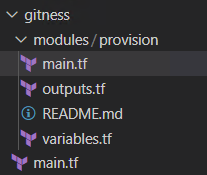
Tofu/terrform code to create Gitness VM from template Login to VM and install docker ce using the following commands.
sudo yum install -y yum-utils
sudo yum-config-manager --add-repo https://download.docker.com/linux/centos/docker-ce.repo
- Install docker
sudo yum install docker-ce docker-ce-cli containerd.io docker-buildx-plugin docker-compose-plugin -y
- Add User to the docker group
sudo usermod -aG docker $USER
- Enable and start the docker services
sudo systemctl enable --now docker.service
sudo systemctl enable --now containerd.service
- Use the following Docker command to install Gitness
docker run -d \
  -p 3000:3000 \
  -v /var/run/docker.sock:/var/run/docker.sock \
  -v /tmp/gitness:/data \
  --name gitness \
  --restart always \
  harness/gitness
- Once the container is running, open
<IP Address:3000>. Select SignUP enter UserID, Email and Password
In my case, i will be accessing using http://gitness.cloudbricks.local:3000