Apache CloudStack — Architecture & Core Concepts
Part 1 of the Apache CloudStack series: components, the zone/pod/cluster/host hierarchy, system VMs, and the object model.
What You’ll Learn
This post gives you the mental model you need before touching an installer: the two halves every CloudStack deployment is built from, how resources nest from region down to host, where primary and secondary storage live, what the three system VM types do, and what actually happens between a user clicking Deploy VM and a running instance.
Part 1 is the map — the commands and screenshots start in Part 2. Everything here is grounded in the official CloudStack documentation, and every section links forward to the installment where we get hands-on.
Background: Virtualization, Hypervisors, and KVM
A quick foundation first, because everything in this series runs on it. Virtualization lets one physical server run many isolated virtual machines (VMs) — each with its own virtual CPU, memory, disk, and NIC, each running its own unmodified guest operating system as if it owned the hardware. The piece of software that creates those VMs and arbitrates the physical resources underneath them is the hypervisor. It is what turns a rack of servers into a pool you can carve up on demand.
Hypervisors come in two broad styles:
| Style | Runs | Typical examples |
|---|---|---|
| Type 1 (bare metal) | Directly on the hardware, no host OS underneath | VMware ESXi, Microsoft Hyper-V, Xen |
| Type 2 (hosted) | As an application on top of a host OS | VMware Workstation, Oracle VirtualBox |
The line is blurrier than the textbook suggests — more on that below. Both styles depend on hardware virtualization extensions in the CPU (Intel VT-x / AMD-V for instruction execution, EPT / NPT for memory virtualization); no extensions, no VMs. See Red Hat’s virtualization platform guide for the canonical type 1 vs. type 2 breakdown.
Why KVM matters here
KVM (Kernel-based Virtual Machine) is the hypervisor Linux uses, and its shape is unusual:
- It is part of the Linux kernel itself — in mainline since kernel 2.6.20 (2007) per the KVM project. Two loadable modules (
kvm.koplus the CPU-specifickvm-intel.koorkvm-amd.ko) turn the kernel into a hypervisor that exposes its control interface at/dev/kvm. - QEMU does the device emulation. The KVM userspace component has been part of mainline QEMU since 1.3, and each guest is effectively a normal Linux process — so KVM inherits the kernel’s scheduler, memory management, and isolation instead of reimplementing them. The KVM API docs show just how small the interface is: open
/dev/kvm, create a VM file descriptor, create vCPU file descriptors, run. - Guests talk to virtual hardware through virtio — paravirtualized disk and network devices (an OASIS open standard) that skip most emulation overhead. That is why
virtiodrivers are the default choice in nearly every KVM-based cloud image. - Day-to-day administration almost always goes through libvirt (
virsh,virt-manager) rather than raw ioctls against/dev/kvm.
Because KVM is Linux, it blurs the type 1/type 2 line — a hardened distribution carrying only what a hypervisor needs behaves exactly like a bare-metal one, with no proprietary hypervisor to license or install separately.
That matters here because CloudStack does no virtualization of its own — it orchestrates hypervisors: driving KVM hosts through an agent, vSphere through vCenter, and so on. KVM is also the hypervisor this series’ lab will run on, and it’s what the small-scale deployment topology from the docs is built around.
Those CPU extensions are also what enable nested virtualization — running a hypervisor inside a VM — which is how single-box labs are possible: a workstation VM that itself hosts guest VMs. When you build your lab, the one thing to check first is that hardware virtualization is present and enabled on the host; everything else installs on top.
CloudStack in 60 Seconds
Apache CloudStack is an open-source infrastructure-as-a-service platform: it orchestrates pools of compute, network, and storage so users can provision VMs, networks, and storage on demand. It is an Apache top-level project, deployed both as private clouds and by commercial providers, and it manages tens of thousands of physical servers across geographically distributed datacenters from a single control plane.
One of its defining traits is that it is not picky about hypervisors — a single cloud can mix them:
| Hypervisor | How CloudStack drives it |
|---|---|
| KVM | Agent service running on each host |
| vSphere | Through vCenter |
| XenServer / Xen Project | Native integration |
| Hyper-V, LXC | Built-in support |
| BareMetal | Via IPMI |
The management server scales near-linearly, and — important architectural point — a management server outage does not affect the instances already running in the cloud. Orchestration pauses; the workloads keep computing.
The Two Halves of a CloudStack Deployment
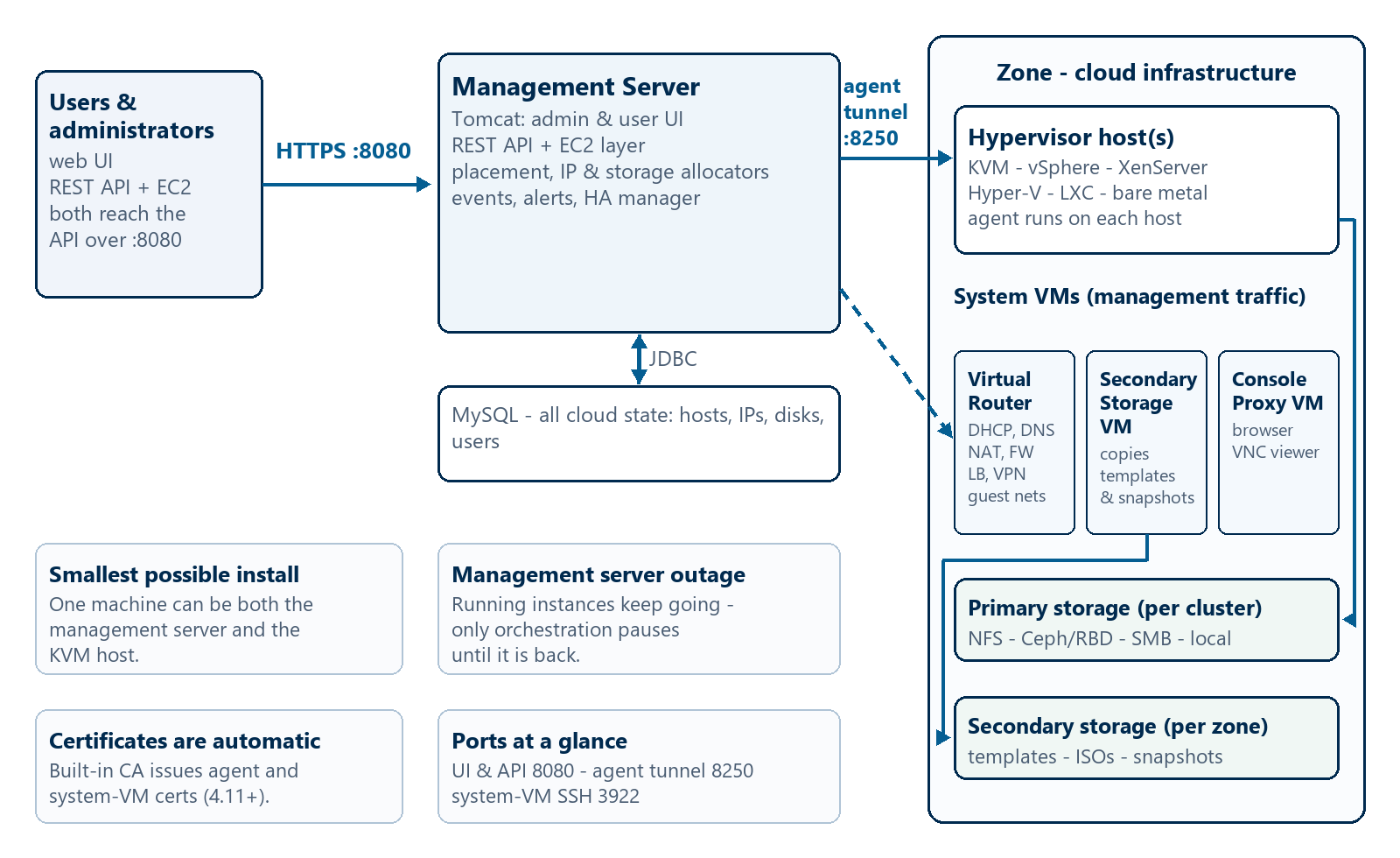
Every deployment, from a laptop lab to a multi-datacenter production cloud, consists of two parts:
- The management server — a Linux service (with a MySQL database) that runs the UI, the API, and all scheduling logic.
- The infrastructure — the hypervisor hosts, storage arrays, and networks you register with it.
What the management server runs
The management server is a Java application (Apache Tomcat) fronted by a REST API, with MySQL holding every bit of cloud state: which hosts exist, which IPs are allocated, who owns which disk. Concretely it provides:
- The admin and user web UI and the REST API (plus an EC2-compatible translation layer), both on port 8080 by default.
- Placement logic — the allocators that choose the cluster, host, IP address, and primary storage pool for every new VM.
- Event handling, alerts, and the HA manager that restarts failed system VMs and (optionally) failed user VMs.
- Usage metering for per-tenant billing data (covered in Part 8).
Hypervisor hosts don’t wait to be polled — they connect out to the management server. KVM hosts run a cloudstack-agent service that maintains a persistent tunnel to the management server on port 8250; since CloudStack 4.11 a built-in certificate authority issues the certificates for agents and system VMs automatically, so no manual PKI dance is needed.
The docs are explicit: your minimum installation is one machine running the management server and one hypervisor host — and a single machine can be both (using KVM). That is exactly the lab layout we will build in Part 2.
Instances never send their application traffic through the management server. If it goes down, running VMs keep running — you lose provisioning, the UI, and the API until it is back. Design around that by running multiple management server nodes behind a load balancer, which we will do in Part 8.
The Object Hierarchy: Region → Zone → Pod → Cluster → Host
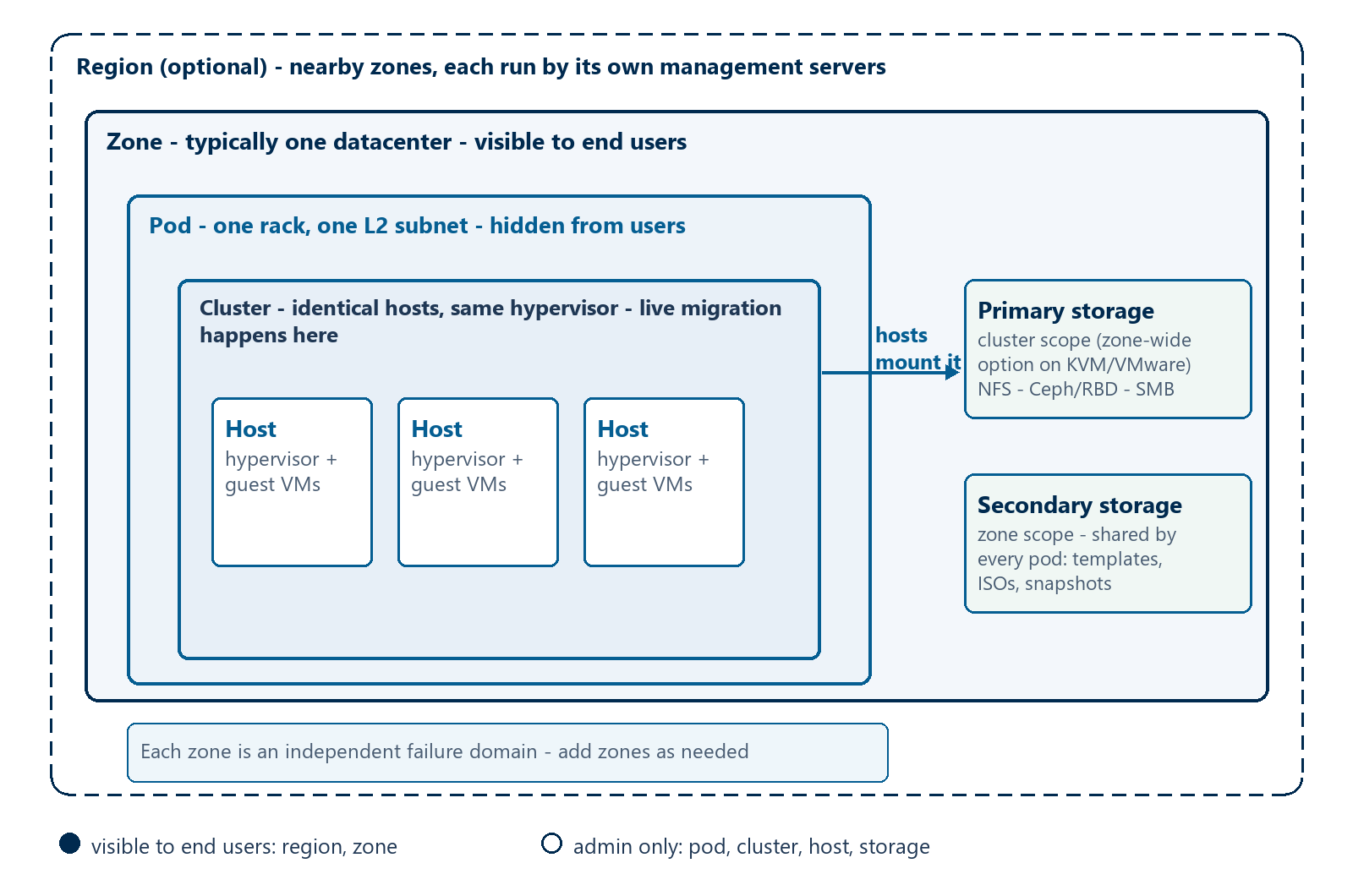
CloudStack organizes the physical world into a strict tree. Learning this once pays off in every later part of the series, because every API call and every UI screen is expressed in these terms.
| Level | Roughly maps to | Visible to end users? | Key property |
|---|---|---|---|
| Region | A geographic area (optional) | Yes | Groups nearby zones; each region runs its own management servers |
| Zone | One datacenter | Yes | Independent power/network failure domain; the unit users pick |
| Pod | One rack, one subnet | No | One layer-2 broadcast domain; pods per zone are counted for capacity |
| Cluster | A pool of hypervisor hosts | No | Identical hosts, same hypervisor — live migration only happens here |
| Host | One physical server | No | Runs the guest VMs; CPU and RAM are auto-detected on registration |
A few nuances worth internalizing:
- Zones are the fault-tolerance boundary. A public cloud can offer multiple zones so customers can spread their instances; physically, each zone is its own power and network domain. You start with one zone and add more as you grow.
- Pods are administrative, not user-facing. A pod is a rack’s worth of equipment sharing one subnet. Users never see pods — only zones.
- Clusters must be homogeneous. Because live migration moves a VM between hosts without downtime, both ends need matching CPU features and hypervisor versions. Clusters are also the unit that limits scale: a cluster can only grow as large as the hypervisor allows.
- Regions are optional. They exist for multi-datacenter deployments: each region has its own management servers and database, and regions synchronize at the user-facing layer so a user in one region can see resources in another.
How this maps to VMware and OpenStack
If you arrive from a vSphere or OpenStack background, this tree clicks faster when you anchor it to what you already know — with the caveat that none of these map one-to-one:
| CloudStack | Closest vSphere equivalent | Closest OpenStack equivalent |
|---|---|---|
| Region | A separate site with its own vCenter and control plane | An OpenStack region (its own API endpoints) |
| Zone | A vSphere datacenter (an inventory and network/storage boundary) | An availability zone — a user-visible failure domain |
| Pod | No real equivalent — think one rack plus one subnet | No equivalent tier — subnets live as Neutron objects |
| Cluster | A vSphere cluster — the live-migration (vMotion) scope | A host aggregate — admin-only grouping of compute nodes |
| Host | An ESXi host | A compute node |
Two observations worth keeping in mind:
- Cluster is the tightest match in the table. Both CloudStack and vSphere require host homogeneity and confine routine live migration to the cluster — CloudStack’s live-migrating VMs and vMotion obey the same constraint.
- OpenStack splits what CloudStack folds together. A CloudStack zone does double duty as failure domain and network scope; OpenStack separates scheduling failure domains (availability zones) from admin grouping (host aggregates) — and has no pod tier at all.
Primary storage is where VM disks live — fast, close to the hosts, scoped to a cluster (with a zone-wide option on KVM and VMware). Secondary storage is the zone’s library — templates, ISOs, and snapshots, shared by every pod. Part 4 goes deep on both, including Ceph, NFS, and the optional S3/Swift object-storage backends.
Physical Networks: Four Traffic Types
Before you wire anything up, learn the four traffic types CloudStack models. Misconfiguring these is the classic first-deployment failure mode, so Part 3 is dedicated to untangling them:
| Traffic type | What flows over it |
|---|---|
| Guest | Tenant VM traffic — VLANs or L2 isolated networks |
| Management | Management server ↔ agents ↔ system VMs (ports 8080, 8250, SSH 3922) |
| Public | Routed traffic to the outside world; floating IPs, load balancer VIPs, console proxies |
| Storage | Secondary storage traffic — template and snapshot downloads |
In advanced zones, the docs reserve VLANs below 500 for management, 500–599 for public, and 600 and above for guest traffic — handy to know when your trunk suddenly stops carrying what you expected. Simpler basic zones (the default for KVM labs) put everything on one physical network and skip the separate public tier entirely.
System VMs: CloudStack’s Control Plane Runs as VMs
Here is a detail that surprises people new to CloudStack: several of its core services don’t run on the management server — they run as special VMs inside the infrastructure, started and stopped automatically by CloudStack itself:
| System VM | What it does |
|---|---|
| Virtual Router | Per-network services: DHCP, DNS, NAT, firewall rules, load balancing, site-to-site VPN |
| Secondary Storage VM (SSVM) | Mounts secondary storage; downloads templates/ISOs from external URLs, copies snapshots |
| Console Proxy VM (CPVM) | Relays the browser’s VNC session to the target VM — one public IP per CPVM, websockify/noVNC since 4.15 |
Details that matter when you debug them:
- All three come from one system VM template (a minimal Debian 12 image with HAProxy, iptables, and Apache). CloudStack creates, starts, and stops them as needed, and expunges them when destroyed — don’t get attached to one.
- You can reach any system VM over SSH on port 3922 using the
id_rsa.cloudkey that ships with the management server. The system VM docs walk through maintenance procedures. - Users cannot SSH into virtual routers. Their network services are managed through network offerings — what the router does is declared by the offering you attach to a network, which is exactly why Part 3 starts with offerings.
- If the HA manager notices a system VM died, it brings it back — that self-healing is why a stuck SSVM usually looks like a symptom (e.g., secondary storage unreachable) rather than the disease.
Putting It Together: What Happens When You Deploy a VM
Everything above in one flow — this is the sequence your API call triggers:
- The user calls the API — through the UI, the EC2-compatible layer, or a direct REST call to port 8080, authenticated with a user’s API key/secret.
- The management server plans the placement. Against MySQL, it picks the zone from the service offering, a cluster with free CPU/RAM, a specific host, an IP from the guest IP range, and a primary storage pool with room for the disk.
- The template is staged. If the chosen primary storage doesn’t already hold the template, the SSVM copies it from secondary storage (downloading it from the source URL first if the library doesn’t have it yet).
- The host agent boots the instance. The command travels down the 8250 tunnel; the agent wires up the virtual NIC and starts the domain on the hypervisor.
- The virtual router configures the network — DHCP lease, DNS records, and the firewall/NAT rules implied by the network offering.
- The console comes up. Browser traffic for VNC goes through the console proxy (noVNC over websockets), so the user needs no direct path to the host.
- Events and usage flow back to the management server — the UI flips the VM to Running, and the usage server starts metering it.
Note what this flow implies: the management server makes every decision, but templates stream through the SSVM, disks are served by primary storage, and packets go out through the virtual router. That separation is why CloudStack keeps working when the control plane is briefly down.
Small Lab vs. Redundant Production
The deployment architecture guide describes two broad shapes:
- Small-scale / lab: one management server, one KVM host, basic zone networking. This is what Part 2 builds, and it fits on a single beefy box with nested virtualization.
- Large-scale redundant: multiple management server nodes behind a load balancer, MySQL replication for the database, and agents configured with the list of all management servers — since 4.11 CloudStack even shuffles that list across agents so load spreads automatically. Loss of a single node changes nothing for users or agents.
Either way the infrastructure side is built the same way: register the zone, add pods, add clusters and hosts, attach storage, then map traffic types to physical NICs. That is the Part 2 checklist.
The User-Side Object Model
The physical tree above is half the picture; the other half is who is allowed to use it. In brief (Part 6 is the deep dive):
- Accounts own resources, and accounts live in a domain tree (root domain → child domains) that lets providers resell capacity with quotas.
- Users belong to an account and own the VMs they create.
- Projects let multiple accounts share resources with isolated, collaborative access.
- Offerings are the menu — VM service offerings (CPU/RAM), disk offerings, network offerings — which turn raw infrastructure into something a user can actually order.
This split — physical infrastructure admins manage, logical resources users order — is the design you’ll see reflected in every API call from Part 7 onward.
The quickest way to locate CloudStack in your head: OpenStack is a collection of projects (Nova, Neutron, Cinder…) glued behind one API, while CloudStack is essentially one integrated service — the management server plus agents — with virtual routing and tenant networking built in rather than plugged in. Fewer moving parts to install, one configuration file, and the network is declared through offerings instead of Neutron plugin matrices.
What’s Next
You now have the vocabulary the rest of the series assumes: management server vs. infrastructure, the region/zone/pod/cluster/host tree, the two storage tiers, the four traffic types, and the three system VMs. Next up, Part 2: Installation & First Deployment — we install the management server, prepare a KVM host, and bring up a working zone end to end.
If you want the series overview first, start at the Learning Path & Roadmap.
Official references: